Brief Overview↪ As WordPress evolves rapidly in 2025, website owners face a critical decision: should you build with Gutenberg, the native block editor, or continue using the feature-rich Elementor page builder? This blog offers a data-driven comparison of both tools with real benchmarks, SEO insights, speed tests, and the latest updates. Whether you’re focused on lightning-fast load times, visual design freedom, or a hybrid setup, this guide breaks down the pros, cons, and ideal use cases—so you can choose the right builder for your website goals.
Page speed and SEO aren’t just buzzwords in 2025—they are the foundation of a successful website.
As Google continues to refine its Core Web Vitals metrics and user experience signals, choosing the right page builder has never been more critical.
Whether you’re a blogger, small business owner, or developer, the debate remains: Gutenberg or Elementor—what’s better for speed and SEO in 2025?
With WordPress powering over 43% of all websites globally, the tools used to build those sites directly affect their performance, user experience, and discoverability.
Gutenberg, the default WordPress block editor, has undergone major improvements in full-site editing and native performance.
On the other hand, Elementor remains a favorite among designers and marketers due to its unmatched flexibility and visual control.
Before diving in, here’s a quick introduction to both page builders:
Gutenberg: is the default WordPress block editor introduced in 2018, designed to offer a modern, block-based content creation experience.
It replaces the classic editor with a streamlined system where users can build layouts using reusable blocks. In 2025, Gutenberg supports full-site editing, theme building, and a growing ecosystem of third-party block plugins.
Elementor: is a third-party visual page builder plugin for WordPress. Launched in 2016, it quickly became a favorite for designers and marketers due to its intuitive drag-and-drop interface, real-time design features, and a vast library of widgets and templates.
Elementor Pro extends functionality with advanced customization options, dynamic content, and WooCommerce tools.
This article dives deep into:
- The latest features and updates in both editors
- Real-world performance benchmarks
- SEO implications of each builder
- Recommendations based on use cases
By the end of this comparison, you’ll have a clear answer on which builder fits your website goals best—and how to use them together if needed.
Why Compare Gutenberg and Elementor in 2025?
As WordPress continues to dominate the CMS landscape in 2025, website creators are faced with an important choice: use the built-in Gutenberg block editor or opt for a third-party page builder like Elementor.
This decision isn’t just about preference, it’s about performance, SEO, and long-term scalability.
Here’s why this comparison matters:
- Performance impacts SEO and user retention: Google’s Core Web Vitals have become stricter. Speed, stability, and interactivity now directly influence rankings. Gutenberg and Elementor generate vastly different code outputs and page sizes, affecting load time, crawlability, and indexability.
- Design flexibility vs lightweight structure: Elementor provides advanced design controls, animations, and dynamic content blocks. Gutenberg prioritizes speed, simplicity, and clean code, but may require plugins to match Elementor’s creative options.
- Workflows vary by user role: Developers, bloggers, and SEO specialists tend to prefer Gutenberg for its native performance and minimal bloat. Agencies and marketers often favor Elementor’s intuitive UI and pre-built templates for fast client delivery.
- Optimization requirements differ: Elementor can match Gutenberg’s speed—if you apply caching, defer JavaScript, host fonts locally, and optimize assets. Gutenberg, by contrast, performs well out-of-the-box.
By comparing these two builders with 2025’s latest updates in mind, you’ll be better equipped to choose the right tool or blend both in a hybrid approach.

What’s New in 2025?
Gutenberg in 2025
- Full Site Editing (FSE) has matured, allowing more theme-based control
- Significant improvements in code output and loading efficiency
- Native pattern and block directory enhancements
- Improved accessibility and keyboard navigation support
- Enhanced support for collaborative editing features using the Gutenberg Cloud API
- Greater compatibility with third-party design systems and block libraries
- Integration of AI tools for content suggestions and layout recommendations
Elementor in 2025
- Major optimizations like conditional asset loading, local font hosting, and leaner DOM structure
- Better integration with WooCommerce and AI-based design suggestions
- New Performance Mode with built-in caching and async script loading
- Elementor AI 2.0: Improved copywriting, image generation, and section layout tools
- Live collaboration and co-editing features for teams and agencies
- Enhanced Theme Builder capabilities with dynamic content blocks
- Native support for custom breakpoints and fluid typography for responsive design
Gutenberg vs Elementor in 2025
| Feature / Category | Gutenberg (Block Editor) | Elementor |
|---|---|---|
| Page Load Time (avg) | ~1.5 seconds (lightweight HTML & fewer assets) | ~2.7–2.9 seconds (depends on widget use & scripts) |
| DOM Size | ~45–70 KB, clean HTML structure | 2.5x heavier DOM, ~570 KB+ page size |
| Core Web Vitals | Excellent scores (LCP ≤ 2.5s, INP ≤ 200ms, CLS < 0.1) | Good with optimization (local fonts, optimized DOM, async JS) |
| Mobile Optimization | Mobile-first responsive structure out of the box | Advanced responsive controls; custom breakpoints |
| Collaboration Support | Experimental real-time collaboration via Gutenberg Cloud API | Full real-time co-editing (Elementor Cloud, Teams add-on) |
| AI Features (2025) | AI-assisted content block suggestions, layout tips | Elementor AI 2.0: smart layout builder, copywriting, image generation |
| Design Flexibility | Basic styling with native and plugin blocks | High-end animations, templates, popups, conditional display logic |
| WooCommerce Integration | Basic product blocks, limited styling | Deep WooCommerce builder: product grids, filters, dynamic templates |
| Templates & Layout Packs | Limited block patterns, extended via plugins (Kadence, Spectra, Stackable) | 300+ templates & kits with Pro; popup builder; global styling |
| Performance Tools | Native lean build, minimal dependencies | Performance Mode, lazy loading, DOM optimization, conditional asset loading |
| SEO Readiness | Excellent out of the box; semantic structure, fast loading | Requires optimization; SEO plugin integration (Rank Math, Yoast, etc.) |
| Plugin Compatibility | Excellent with most WP plugins, minimal conflicts | Compatible with many plugins but more prone to JS/CSS conflicts due to heavy frontend |
| Ease of Use | Moderate; less visual, block-based interface | Very intuitive; live drag-and-drop WYSIWYG editor |
| Accessibility Compliance | Improved ARIA roles, semantic HTML, native accessibility support | Accessibility improving; some widgets need extra tweaks |
| Learning Curve | Slightly steeper for non-tech users | Beginner-friendly with visual learning curve |
| Cost | Free (built-in) + optional block plugins | Free basic; Pro starts ~$59/year |
| Custom Code Control | Developers can write custom blocks, functions, and PHP templates | Supports custom CSS/JS in UI; less flexible than Gutenberg for theme development |
| Theme Builder | Theme editing through FSE (limited dynamic content) | Advanced theme builder: headers, footers, dynamic loops, custom conditions |
| Best For | Blogs, news sites, SEO-heavy content, developer-focused builds | Business sites, agencies, landing pages, eCommerce, design-heavy projects |
| Use in Hybrid Workflow | Ideal for post/page content | Ideal for landing pages, sales funnels, product pages |
| Support & Ecosystem | Core WordPress community, GitHub discussions | Huge third-party ecosystem + premium customer support for Pro users |
User Interface & Editing Experience: Gutenberg vs Elementor
The user interface can make or break your workflow—especially when building and managing multiple pages. In 2025, both Gutenberg and Elementor offer distinct editing experiences tailored to different types of users.
Gutenberg: Minimalist, Fast, Native\

Gutenberg’s interface is tightly integrated with the WordPress core. It’s clean, distraction-free, and designed for content-focused users.
Blocks are organized logically, and the block toolbar adapts depending on what you select. With the full-site editor (FSE), you can now edit headers, footers, templates, and patterns—all from one streamlined dashboard.
- Fast-loading, native editor
- Sidebar block settings are simple and responsive
- Best suited for those comfortable with WordPress conventions
While powerful, Gutenberg’s interface can feel limited if you’re used to drag-and-drop freedom or need advanced design controls.
Elementor: Visual, Dynamic, Drag-and-Drop
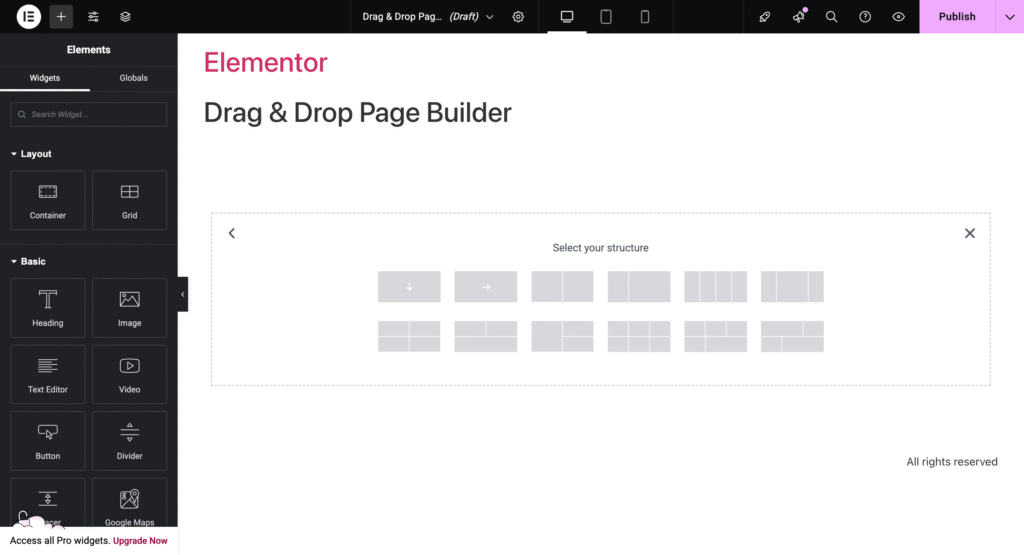
Elementor’s interface is designed for real-time visual editing. You see exactly how your site will look as you build it, with a side panel full of widgets, design controls, and responsive settings.
- True WYSIWYG (what you see is what you get)
- Drag-and-drop everything—from columns to custom widgets
- AI-powered suggestions and content generation integrated into the UI
Elementor also supports global colors, theme styles, and a navigator panel for precise control over sections and layers—making it ideal for pixel-perfect designs.
Summary
| Feature | Gutenberg | Elementor |
|---|---|---|
| Editing Style | Block-based | Visual drag-and-drop |
| Interface Speed | Very fast | Slightly heavier |
| Learning Curve | Moderate | Beginner-friendly |
| Real-Time Visual Editing | ❌ No (Preview-based) | ✅ Yes |
| Best For | Writers, Developers | Designers, Marketers |
Gutenberg vs Elementor: 2025 Winner List
| Feature / Category | Winner |
|---|---|
| Page Speed | Gutenberg |
| Core Web Vitals | Gutenberg |
| Design Flexibility | Elementor |
| Performance Optimization | Tie |
| SEO Readiness | Gutenberg |
| AI Features | Elementor |
| Real-Time Collaboration | Elementor |
| WooCommerce Integration | Elementor |
| Cost & Licensing | Gutenberg |
| Plugin Compatibility | Gutenberg |
| Theme Building | Elementor |
| Learning Curve | Elementor |
| Best Use Case Adaptability | Tie |
| Hybrid Strategy Viability | Tie |
| Long-Term Sustainability | Gutenberg |
| Future Growth Potential | Gutenberg |
SEO Impacts & Advantages
In 2025, Google’s ranking algorithm heavily favors websites that provide excellent user experience, especially in terms of Core Web Vitals—which include metrics like Largest Contentful Paint (LCP), Cumulative Layout Shift (CLS), and Interaction to Next Paint (INP). These metrics are directly influenced by:
- Page speed: Faster-loading sites get higher engagement and lower bounce rates, which contribute positively to SEO.
- Code cleanliness: Clean HTML and minimal use of scripts improve crawlability, rendering efficiency, and reduce layout shifts.
Gutenberg’s SEO Advantage
- Native integration with WordPress means Gutenberg outputs leaner, semantic HTML by default.
- Pages built with Gutenberg typically score 95+ in Google PageSpeed Insights, which translates to better Core Web Vitals performance.
- Its minimal DOM size and fewer HTTP requests improve crawl speed and mobile responsiveness—key factors for SEO.
- Content is easier for search engines to parse and index without unnecessary wrapper elements or bloat.
- Gutenberg’s tight alignment with WordPress core updates ensures long-term compatibility with SEO best practices.
Elementor’s SEO Potential (With Optimization)
- While Elementor includes more design elements and scripts, it can still achieve strong SEO performance if properly optimized.
- Key optimization steps include:
- Enabling Elementor Performance Mode
- Disabling unused widgets
- Local font hosting
- Using a lightweight theme like Hello or Astra
- Installing caching and asset minification plugins (e.g., WP Rocket, FlyingPress)
- Elementor now includes features like Web Vitals Monitoring and conditional asset loading, which help narrow the performance gap.
- Real-world cases (e.g., cmsminds.com, Unlimited Elements) show Elementor-built sites ranking in top SERPs with proper technical SEO setup.
Ease of Use & Design Flexibility
When choosing a page builder in 2025, two of the most important user experience factors are ease of use and design flexibility.
Both Gutenberg and Elementor have matured significantly, but they still cater to different types of users and workflows.
Gutenberg – Streamlined but Developer-Oriented
Gutenberg has made great strides in usability since its early days. In 2025, it offers:
- Drag-and-drop block editing, reusable patterns, and improved full-site editing.
- Native support for fluid typography, spacing controls, and layout management.
- A lighter interface with fewer distractions, which helps content creators focus.
However, while Gutenberg is fast and integrated with the WordPress core, it requires more technical knowledge to build complex layouts.
For pixel-perfect designs or animations, users often rely on third-party block libraries or custom CSS.
🟢 Ideal for: Writers, bloggers, developers, and performance-focused users.
Elementor – Intuitive, Visual, and Powerful
Elementor continues to lead in ease of use and design freedom:
- Real-time visual editing with drag-and-drop sections, widgets, and styling options.
- No-code control over every element’s appearance—typography, spacing, animation, responsiveness.
- Extensive library of templates, kits, and AI-powered suggestions for faster building.
Elementor 2025 also supports live collaboration, custom breakpoints, and AI layout assistants, making it easier than ever to design responsive, branded websites without touching a line of code.
🔵 Ideal for: Designers, freelancers, agencies, and small business owners who need fast visual results.
Use Cases: Who Should Use What?
Deciding between Gutenberg and Elementor in 2025 ultimately comes down to what kind of website you’re building, your technical skill level, and your performance priorities. Here’s a breakdown of who each builder is best suited for:
Gutenberg – Best for Performance-First, Content-Heavy Sites
Gutenberg is ideal for bloggers, publishers, SEO professionals, and developers who want fast-loading pages, clean code, and maximum control over performance.
If your primary goal is search engine visibility and Core Web Vitals compliance, Gutenberg provides a lightweight, native editing experience with minimal overhead.
It’s also the best fit for developers building scalable sites or anyone using the block editor for full-site editing with minimal plugin reliance.
Elementor – Best for Designers, Marketers & Business Sites
Elementor shines when design flexibility is a priority. It’s perfect for web designers, freelancers, and digital marketers who need pixel-perfect control over layout, animations, and branding.
With its visual drag-and-drop interface and massive template library, Elementor enables fast deployment of professional-looking pages, even for non-developers.
It’s also highly suitable for eCommerce site owners using WooCommerce, as Elementor Pro offers dynamic product templates, shopping cart customization, and advanced widget integrations.
Conclusion & Recommendation
In 2025, the choice between Gutenberg and Elementor is no longer about which tool is “better” overall.
it’s about which one is right for your goals. If you’re building a content-heavy site where speed, SEO, and clean code are priorities, Gutenberg is the clear winner.
It’s lightweight, performs better out of the box, and continues to improve with full-site editing and accessibility features.
You’ll spend less time optimizing and more time ranking. On the other hand, if your focus is on design flexibility, visual storytelling, and marketing conversion, Elementor still leads.
Its drag-and-drop interface, massive template library, and AI-powered tools make it perfect for agencies, designers, and business owners who want to launch fast, branded websites without code.
💡 Pro Tip: Combine the strengths of both! Use Gutenberg for core content and Elementor for high-converting visuals.
What’s Your Experience?
Have you used Gutenberg, Elementor, or both in your recent WordPress projects?
What did you find most helpful—or most frustrating—in 2025?
👇 Drop a comment below and share your thoughts.
Let’s help fellow creators make the right choice based on real-world experiences!
FAQ’s
Q. Which page builder is faster in 2025. Gutenberg or Elementor?
Ans: Gutenberg is faster out of the box. It produces cleaner, lighter HTML with fewer scripts, resulting in faster load times (~1.5s average) and better Core Web Vitals scores compared to Elementor (~2.7–2.9s average), which requires optimization for similar performance.
Q. Which builder is better for SEO in 2025?
Ans: Gutenberg leads in SEO readiness due to clean code, semantic HTML, and excellent Core Web Vitals performance. Elementor can also be SEO-friendly if optimized with tools like caching, lazy loading, and font hosting.
Q. Has Elementor improved performance in 2025?
Ans: Yes. Elementor 2025 includes Performance Mode, conditional asset loading, async script handling, and native support for local fonts, all aimed at narrowing the performance gap with Gutenberg.
Q. Is Gutenberg suitable for beginners in 2025?
Ans: Gutenberg has improved usability but still has a steeper learning curve for non-technical users. It’s ideal for developers, bloggers, and performance-conscious users. Beginners may find Elementor more intuitive.
Q. Which builder is better for WooCommerce sites in 2025?
Ans: Elementor is the better choice for WooCommerce. It provides dynamic product grids, filters, and a robust WooCommerce builder, while Gutenberg offers only basic product blocks and limited styling options.
Helpful read: